
Introduction
Every marketer has stared at a blank screen, wondering where the first sentence would come from. In 2026, that problem has a name — and a solution.
AI writing tools have gone from novelty to necessity. Whether you run a startup, manage an in-house content team, or work with a digital marketing agency, you’ve probably already tried one of these tools. If you haven’t, you’re slower than your competition.
But here’s the honest truth: not every AI writing tool is built the same. Some are fantastic at long-form blog content. Others shine with ad copy, product descriptions, or SEO briefs. Choosing the wrong one wastes money and produces content that reads like it was written by a machine — because it was.
This guide breaks down the 12 best AI tools for content writing in 2026, covering everything from how each tool works to who it’s built for, what it costs, and where it genuinely falls short. No fluff. No filler. Just what you need to make a smart decision.
What Are AI Writing Tools?
AI writing tools are software applications that use large language models (LLMs) to help humans plan, draft, optimize, and refine written content. They work by processing your prompt — a topic, a keyword, an outline, or an instruction — and generating text based on patterns learned from vast amounts of internet content, books, and structured data.
These aren’t just autocomplete on steroids. Modern AI content generators can:
- Research and outline an article in under 60 seconds
- Adapt to a brand voice and tone
- Optimize content for specific SEO keywords
- Translate, repurpose, and summarize existing content
- Write product pages, email sequences, and social captions
The underlying technology — transformer-based models like GPT-4o, Claude 3.5, and Gemini — has matured significantly. In 2026, the gap between AI-generated and human-written content is narrower than ever, which is exactly why choosing the right tool matters more.
Why AI Writing Tools Are Essential in 2026
Content demand has outpaced human production capacity. A 2025 HubSpot survey found that brands publishing 11 or more pieces of content per month generate 3x more traffic than those publishing 4 or fewer. That’s an ambitious target for any team without AI assistance.
Here’s what’s driving adoption in 2026:
- Search algorithms reward freshness. Google’s Helpful Content updates have pushed sites to produce consistent, topically authoritative content. AI tools make that possible at scale.
- Short-form content is exploding. LinkedIn posts, Instagram carousels, YouTube scripts — every platform wants original content, constantly.
- Personalization at scale. AI tools can now adapt the same piece of content into different formats, tones, and audience segments with minimal effort.
- Cost pressure is real. Hiring experienced writers for every content need is expensive. AI tools allow lean teams to punch above their weight.
Key Features to Look for in AI Writing Tools
Before paying for a subscription, evaluate every tool against these criteria:
Content quality — Does the output read naturally, or does it sound like a product description from 2012?
SEO optimization — Can the tool write with target keywords, include proper heading structures, and produce meta descriptions?
Customization — Does it learn your brand voice, or does every output sound the same?
Plagiarism and originality — Does it generate unique content, or does it borrow too closely from training data?
Integrations — Does it connect with your CMS, Google Docs, or project management tools?
Output formats — Can it handle blog posts, social copy, email sequences, and product descriptions?
Pricing vs. output volume — Is the cost justified by what you actually produce?
AI Writing Tool Usage Statistics (2026 Estimates)
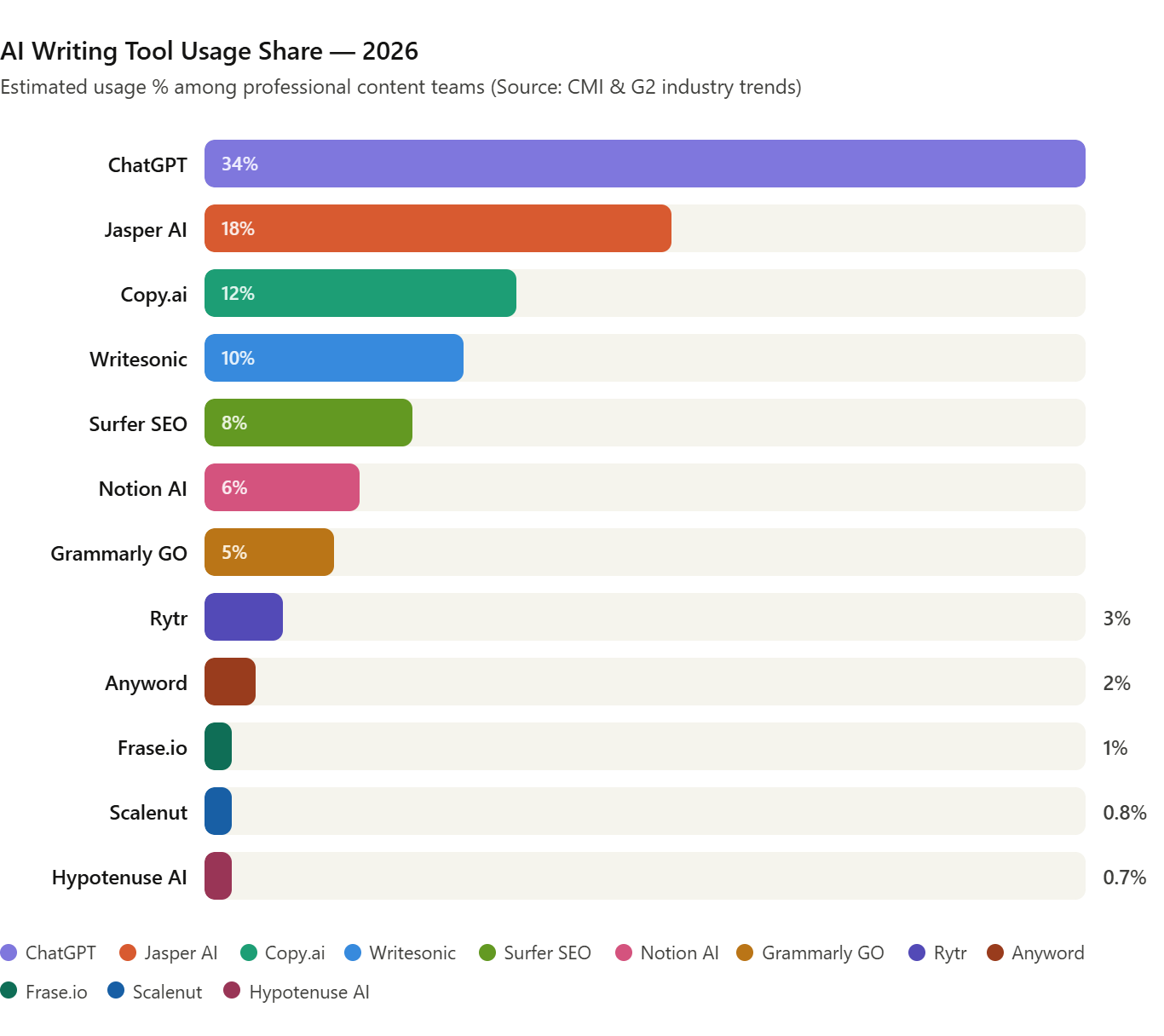
Industry data from Content Marketing Institute and G2 suggest the following approximate market share among professional content teams:
| Tool | Estimated Usage % |
|---|---|
| ChatGPT (OpenAI) | 34% |
| Jasper AI | 18% |
| Copy.ai | 12% |
| Writesonic | 10% |
| Surfer SEO + AI | 8% |
| Notion AI | 6% |
| Grammarly GO | 5% |
| Rytr | 3% |
| Anyword | 2% |
| Frase.io | 1% |
| Scalenut | 0.8% |
| Hypotenuse AI | 0.7% |
The 12 Best AI Writing Tools in 2026
1. ChatGPT (OpenAI) — 34% Usage
What it is: ChatGPT is the most widely used AI writing tool on the planet. Built on OpenAI’s GPT-4o model, it functions as a conversational AI assistant capable of producing almost any type of written content — from 3,000-word blog posts to punchy Twitter threads.
How it works: You type a prompt or have a back-and-forth conversation. The model generates text based on the context you provide, and you can refine it with follow-up instructions. With memory enabled, it learns your preferences over time.
Real-world use case: A content manager at an e-commerce brand uses ChatGPT to write first drafts of product category pages. She feeds it a keyword list, a competitor URL for reference structure, and a brand voice guide. The result goes through one human editing pass before publishing.
Key Features: – GPT-4o model with real-time web browsing – Memory and custom instructions – Code interpreter for data analysis – Image generation via DALL·E – API access for custom workflows – Supports 50+ languages
Pros: – Extremely versatile — handles any writing task – Excellent at following nuanced instructions – Consistent output quality across long documents – Strong reasoning for research-based writing
Cons: – No native SEO scoring or keyword tracking – Free plan limits can be frustrating – Doesn’t integrate directly with most CMS platforms – Still requires human editing for brand-critical content
Best For: Marketers, bloggers, agencies, and developers who need a flexible, general-purpose writing assistant.
Pricing: Free | Plus $20/month | Team $25/user/month
2. Jasper AI — 18% Usage
What it is: Jasper was purpose-built for marketing teams. It’s one of the most mature AI content platforms, with templates specifically designed for ad copy, blog posts, product descriptions, email sequences, and social content.
How it works: You choose a template (e.g., “Blog Post Intro,” “PAS Framework Ad,” “SEO Meta Description”), fill in your inputs, and Jasper generates polished output. Its Brand Voice feature lets you upload existing content so it writes in your company’s specific style.
Real-world use case: A digital marketing agency uses Jasper to produce first drafts of Facebook ad copy for 12 different clients simultaneously. Each client has a saved Brand Voice profile. The team reviews and approves copy in a fraction of the time it would take to write from scratch.
Key Features: – Brand Voice and Style Guide customization – 50+ marketing-specific templates – Jasper Campaigns for multi-channel content – Built-in plagiarism checker (powered by Copyscape) – Native integrations with Surfer SEO and Google Docs
Pros: – Purpose-built for marketing, not general use – High-quality output for ad copy and sales pages – Strong team collaboration features – SEO integration with Surfer is a genuine advantage
Cons: – Premium pricing — not budget-friendly for solo users – Can feel over-templated for creative projects – Occasional repetition in longer content – Requires more setup than ChatGPT to get good results
Best For: Marketing teams, agencies, and brands that produce high volumes of campaign-specific content.
Pricing: Creator $49/month | Pro $69/month | Business (custom)
3. Copy.ai — 12% Usage
What it is: Copy.ai started as a copywriting tool and has evolved into a full-scale Go-To-Market (GTM) AI platform. It’s particularly strong for sales and marketing content — email outreach, LinkedIn posts, landing pages, and sales sequences.
How it works: Copy.ai’s workflow feature lets you build automated content pipelines. You can chain prompts together, pull data from external sources, and have the AI produce content that feeds directly into your sales or marketing stack.
Real-world use case: A SaaS startup uses Copy.ai’s workflow automation to generate personalized cold email sequences. The tool pulls company names and pain points from a CRM export and writes unique, contextual outreach at scale — a process that used to take their SDR team two full days now runs in 30 minutes.
Key Features: – Automated Workflow builder – 90+ copywriting templates – Chat mode for conversational content creation – Brand Voice and tone customization – CRM and Salesforce integrations
Pros: – Excellent for outbound sales and email copy – Workflow automation saves significant time – Clean, intuitive interface – Generous free plan compared to competitors
Cons: – Less effective for long-form SEO content – Workflows require some setup time to configure – Output can sound formulaic without customization – Limited image or multimedia features
Best For: Sales teams, growth marketers, and startups focused on outbound and email marketing.
Pricing: Free | Starter $49/month | Advanced $249/month
4. Writesonic — 10% Usage
What it is: Writesonic is a comprehensive AI content platform with one of the broadest feature sets in the market. It covers long-form blog articles, landing pages, product descriptions, and even has an AI chatbot builder (Botsonic) and an AI search engine (Chatsonic).
How it works: Writesonic’s Article Writer 6.0 can generate a complete SEO-optimized blog post — with real-time web data, citations, and proper heading structures — from a single keyword input. The tool actively searches the web for current information rather than relying solely on training data.
Real-world use case: An affiliate marketing site uses Writesonic to produce 20 product review articles per week. The AI pulls real-time pricing and feature data, compares products, and generates comparison tables automatically. Human editors do final passes for accuracy.
Key Features: – Article Writer 6.0 with real-time web research – Chatsonic AI search with web browsing – Factual Content Mode with citations – 100+ templates across content types – WordPress and Shopify direct integration
Pros: – One of the best tools for factual, research-based articles – Real-time web data makes content more current – Wide template library for every content need – Solid free plan with generous word limits
Cons: – Quality can vary between templates – Interface can feel cluttered – Long-form content sometimes loses coherence mid-article – Customer support response times can be slow
Best For: Bloggers, affiliate marketers, and content agencies producing high-volume, research-based articles.
Pricing: Free | Individual $20/month | Standard $99/month
5. Surfer SEO (AI Writing Feature) — 8% Usage
What it is: Surfer SEO is primarily an SEO optimization platform, but its AI content generation has become a first-class feature. The key differentiator is that it writes content while simultaneously analyzing the top-ranking pages for your target keyword, giving you a real-time Content Score as you write.
How it works: Enter your target keyword. Surfer analyzes the top 20 SERP results and builds a real-time data model of what a high-ranking article should look like — word count, heading structure, NLP keywords, semantic terms. The AI then generates a draft built around that analysis, and you can edit directly in the tool while tracking your score.
Real-world use case: An SEO manager at a B2B SaaS company uses Surfer to plan and write blog content. Every article is built around a target keyword cluster, and the AI draft is optimized before a single human edit — starting with a Content Score above 70 instead of zero.
Key Features: – Real-time Content Score during editing – NLP-powered keyword recommendations – SERP analysis for top 20 competitors – Topical Authority Map for content planning – Jasper AI integration for enhanced drafting
Pros: – Best-in-class for SEO-optimized content creation – Takes the guesswork out of keyword optimization – Excellent for teams managing large editorial calendars – Strong data visualization for content planning
Cons: – Expensive relative to pure writing tools – Not ideal for non-SEO content (ads, emails, social) – Learning curve for new SEO writers – AI-generated drafts still need significant editing
Best For: SEO managers, content strategists, and agencies focused on organic search growth.
Pricing: Essential $99/month | Scale $219/month | Enterprise (custom)
6. Notion AI — 6% Usage
What it is: Notion AI is a writing assistant built directly into Notion, one of the most popular productivity and documentation platforms. Rather than a standalone tool, it’s an intelligence layer inside your existing workspace — ideal for teams already using Notion for project management and wikis.
How it works: Highlight any text in Notion and ask the AI to improve, shorten, translate, or repurpose it. Start from a blank page and ask it to generate a first draft from a brief. Ask it to summarize a long document into key takeaways. It works natively within your existing workflow without switching tabs.
Real-world use case: A product team uses Notion AI to write and maintain their internal knowledge base. When a new feature ships, the developer adds brief technical notes. Notion AI turns those notes into polished user-facing documentation and release notes in minutes.
Key Features: – AI built into the Notion workspace – Summarize, translate, improve, and simplify text – Generate drafts from outlines or bullet points – Q&A over your entire Notion database – No context switching — everything in one place
Pros: – Seamless for existing Notion users – Great for internal documentation and team content – No extra tool to manage – Surprisingly good for structured writing
Cons: – Limited for external marketing or SEO content – Quality doesn’t match specialized writing tools – Requires a Notion subscription to access – Not designed for long-form editorial work
Best For: Product teams, startups, and knowledge-heavy businesses already using Notion.
Pricing: Notion AI add-on: $10/member/month (requires Notion subscription)
7. Grammarly GO — 5% Usage
What it is: Grammarly has been the go-to grammar and style checker for years. In 2024, it launched Grammarly GO — a generative AI layer that turns the platform from a proofreading tool into a full writing assistant. It now helps you draft, rewrite, and ideate, not just correct.
How it works: Grammarly GO works as a browser extension, desktop app, and Microsoft Office integration. As you write, it suggests rewrites, flags tone issues, and can generate full drafts from your prompts. It also adapts to your writing goals (e.g., “professional email,” “persuasive proposal”) and audience.
Real-world use case: A freelance consultant uses Grammarly GO to write and refine client proposals. She drafts the key points in rough form, and the AI reshapes them into polished, persuasive language. The final proposal goes out 40% faster without losing personal voice.
Key Features: – AI-powered drafting and full rewrites – Tone detection and adjustment – Plagiarism checker (premium) – Works across Gmail, Google Docs, Outlook, LinkedIn – Writing goals and audience settings
Pros: – Works everywhere — no platform switching – Excellent for refining and polishing existing content – Trusted by millions; consistent quality – Combines grammar checking with generation
Cons: – Not designed for high-volume content production – Generative features feel secondary to editing – Premium pricing for the full feature set – Less capable than dedicated AI writers for long-form work
Best For: Professionals, freelancers, and students who need both writing assistance and quality checking in one place.
Pricing: Free | Premium $30/month | Business $25/member/month
8. Rytr — 3% Usage
What it is: Rytr is a budget-friendly AI writing tool aimed at solopreneurs, small business owners, and freelancers who need decent content at an affordable price. It doesn’t have the power of Jasper or the SEO intelligence of Surfer, but for the price, it delivers solid, usable output.
How it works: Select a use case from the template library (blog section, email subject line, product description), choose a tone, and give Rytr a short input. It generates several content variations. You pick your favorite, edit inline, and move on.
Real-world use case: A freelance social media manager uses Rytr to generate captions and hashtag sets for 15 client accounts. The tool produces 3-4 variations per post, and she selects and personalizes the best option — cutting caption-writing time from 30 minutes per client to under 5.
Key Features: – 40+ use case templates – 20+ tone of voice options – Built-in plagiarism checker – Chrome extension for in-browser writing – Supports 30+ languages
Pros: – Most affordable AI writing tool in this list – Simple interface with minimal learning curve – Surprisingly good for short-form content – Good multilingual support
Cons: – Not suitable for complex long-form articles – Limited customization compared to premium tools – Output can feel generic without much prompting – No native SEO features
Best For: Budget-conscious solo creators, small business owners, and social media managers.
Pricing: Free (10,000 characters/month) | Unlimited $9/month | Premium $29/month
9. Anyword — 2% Usage
What it is: Anyword is the most performance-focused AI writing tool in this list. Its distinguishing feature is a Predictive Performance Score — it estimates how well your copy will perform with a specific audience before you publish it. That’s a powerful concept for paid advertising and conversion-focused content.
How it works: Write or generate copy, and Anyword scores it against performance data from billions of ad impressions. It can also connect to your actual ad account to learn what has historically worked for your audience, making the predictions increasingly accurate over time.
Real-world use case: A performance marketing agency uses Anyword to write and score Facebook and Google ad variations before launching a campaign. Instead of A/B testing 20 variations live, they test 100 variations in Anyword and run only the top 5. CPC dropped by 28% over two months.
Key Features: – Predictive Performance Score for copy – Audience-specific performance analytics – Ad account integration (Facebook, Google) – 100+ marketing templates – Brand Voice and style customization
Pros: – Unique performance prediction feature – Excellent for paid advertising and direct response copy – Data-driven insights make decisions more confident – Strong team collaboration features
Cons: – Expensive for teams focused on organic content – Performance scores are estimates, not guarantees – Less versatile for non-advertising content – Smaller user community than larger tools
Best For: Performance marketers, paid media teams, and conversion-focused copywriters.
Pricing: Starter $49/month | Data-Driven $99/month | Business $499/month
10. Frase.io — 1% Usage
What it is: Frase sits at the intersection of SEO research and AI writing. It’s built specifically for content teams that want to research, outline, and write search-optimized content using SERP data as the foundation — similar to Surfer SEO but at a lower price point.
How it works: Type your target keyword. Frase pulls the top 20 Google results and analyzes them for topics, questions, headings, and word count. It then builds an AI-powered outline for your article. The AI writer generates draft sections based on that research, and a Topic Score tracks how comprehensively you’re covering the subject.
Real-world use case: A content agency uses Frase to brief its writers more accurately. Before assigning an article, the content manager generates a Frase brief that includes competitor analysis, key questions to answer, and a recommended outline. Writers produce better first drafts because they have a smarter brief.
Key Features: – SERP-driven content research – AI-powered article outlining – Topic Score (similar to Content Score) – Content brief generation for writer workflows – Document collaboration for teams
Pros: – More affordable than Surfer SEO – Excellent research and briefing workflow – Good for factual, well-structured articles – Clean, focused interface
Cons: – AI writing quality below Jasper or ChatGPT – Limited template options for non-SEO content – Lacks real-time web browsing for current facts – Limited third-party integrations
Best For: SEO content teams and agencies that want affordable SERP-backed writing without the premium cost of Surfer.
Pricing: Solo $15/month | Basic $45/month | Team $115/month
11. Scalenut — 0.8% Usage
What it is: Scalenut combines AI writing with an SEO Cruise Mode — a guided workflow that takes a keyword from research to fully written, optimized article in a structured process. It’s a strong choice for teams that need both content planning and execution in one platform.
How it works: Enter a keyword, and Scalenut’s Cruise Mode walks you through topic research, NLP keyword selection, outline approval, and AI-assisted drafting, section by section. Unlike tools that dump a full article at once, Cruise Mode keeps you in control at each stage.
Real-world use case: A financial services blog uses Scalenut to produce compliance-aware content. Because the tool produces section-by-section drafts, the editor can review each part for accuracy before the AI moves to the next — reducing compliance risk compared to reviewing a full AI draft.
Key Features: – SEO Cruise Mode for guided article creation – NLP keyword analysis and recommendations – Content optimizer for existing articles – Link management and internal linking suggestions – Traffic Analyzer for performance tracking
Pros: – Structured workflow reduces editing time – Strong NLP keyword coverage recommendations – Good value for SEO teams – Internal linking features are genuinely useful
Cons: – Interface has a steeper learning curve – Cruise Mode can feel rigid for experienced writers – Less versatile for non-blog content types – Customer support quality is inconsistent
Best For: Content teams in regulated industries, SEO writers who prefer structured drafting workflows.
Pricing: Essential $39/month | Growth $79/month | Pro $149/month
12. Hypotenuse AI — 0.7% Usage
What it is: Hypotenuse AI is purpose-built for e-commerce. If you manage a product catalog with hundreds or thousands of SKUs and need unique, compelling product descriptions at scale, this is one of the most efficient tools available.
How it works: Upload a product catalog (CSV or direct Shopify/WooCommerce integration). Provide sample descriptions to train the tool on your brand voice. Hypotenuse generates unique, brand-consistent descriptions for every product in your catalog. Large batches that would take a team weeks run in hours.
Real-world use case: An online fashion retailer with 4,000 SKUs used Hypotenuse AI to rewrite their entire product catalog after a rebrand. The tool generated all 4,000 descriptions in two days, consistent in tone and structure. Manual writing would have taken three months.
Key Features: – Bulk product description generation – Brand voice training from uploaded samples – Shopify and WooCommerce direct integration – Blog content and social media generation – Factual grounding to reduce hallucinations
Pros: – Best-in-class for e-commerce product content – Batch processing saves enormous time – Brand voice training produces consistent output – Strong catalog management tools
Cons: – Very specialized — not versatile beyond e-commerce – Overkill (and expensive) for small catalogs – Limited SEO keyword targeting features – Weak for long-form editorial content
Best For: E-commerce brands, retailers, and marketplace sellers managing large product catalogs.
Pricing: Starter $29/month | Growth $59/month | Enterprise (custom)
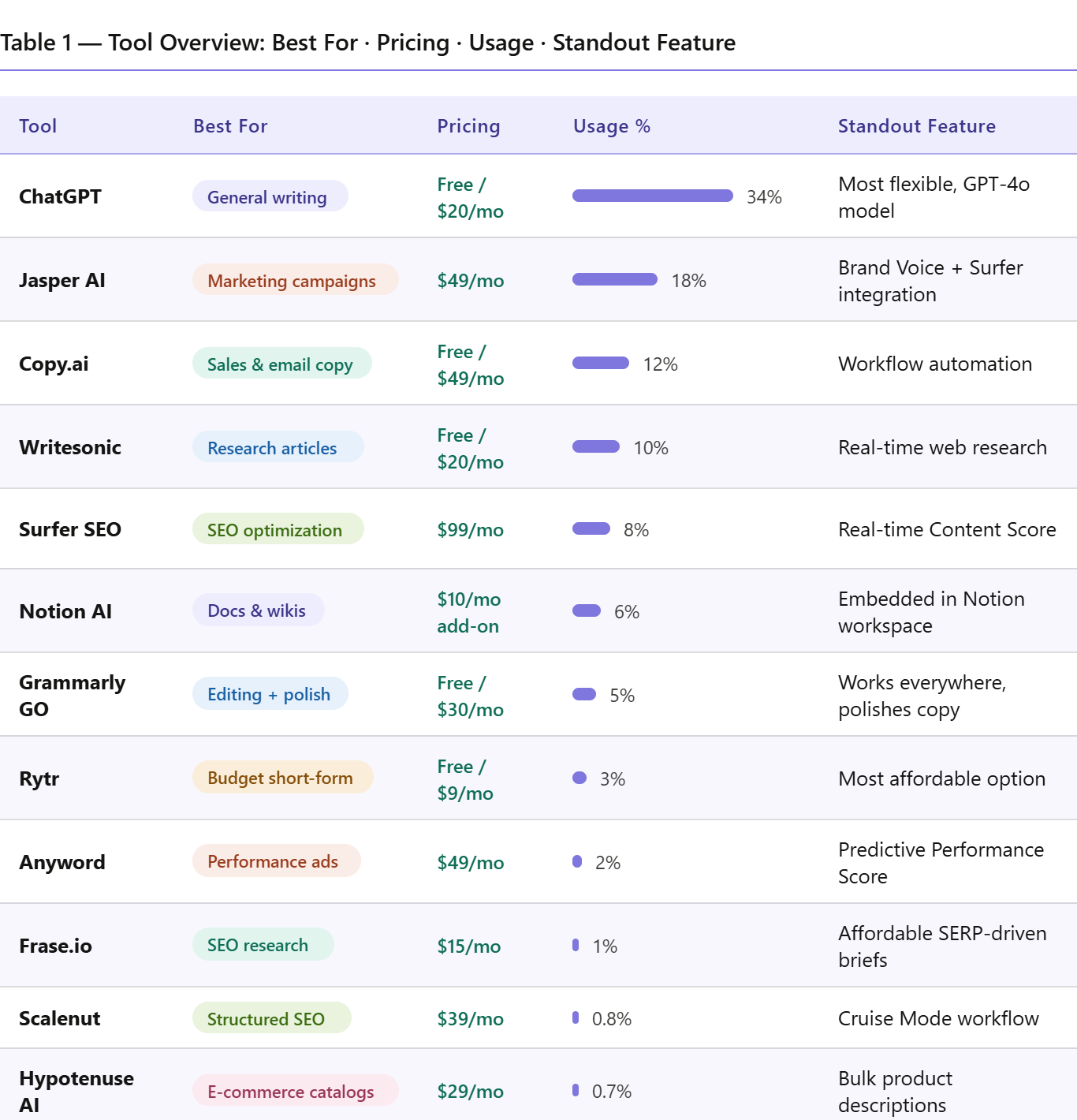
Comparison Table 1: All Tools at a Glance
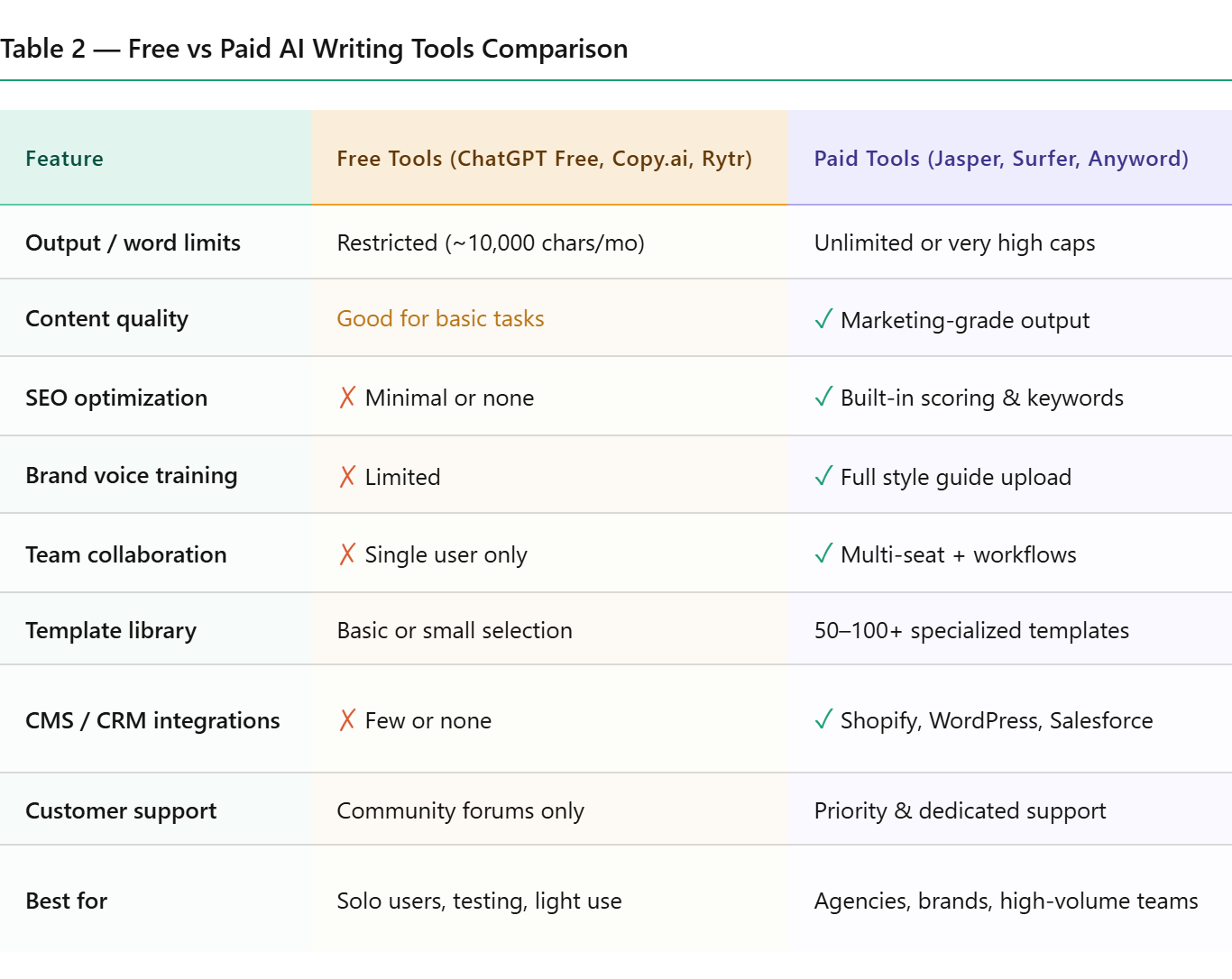
Comparison Table 2: Free vs Paid AI Writing Tools
How to Choose the Right AI Writing Tool
Before you sign up for anything, answer these four questions:
- What type of content do you produce most? – Blog posts and SEO articles → Surfer SEO, Frase, Writesonic, Scalenut – Ad copy and marketing campaigns → Jasper, Anyword, Copy.ai – Product descriptions at scale → Hypotenuse AI – Internal documentation → Notion AI – General-purpose content → ChatGPT
- What’s your budget? – Under $20/month → Rytr, Writesonic Free, ChatGPT Plus – $20–$60/month → Frase, Scalenut, Copy.ai Starter – $60–$150/month → Jasper Pro, Surfer Essential, Anyword Data-Driven – Agency or enterprise → Jasper Business, Surfer Scale, Anyword Business
- Do you need SEO built in? If organic search is a primary traffic channel, invest in Surfer SEO or Frase rather than a general writing tool. A great AI writer without SEO optimization still requires significant manual work to rank.
- Are you an individual or a team? Solo users get strong value from ChatGPT Plus or Rytr Unlimited. Growing teams benefit from the collaboration features in Jasper Pro or Copy.ai Advanced, which allow shared brand voices, approval workflows, and usage analytics.
Pro Tips From Digital Marketing Professionals
Use AI for the draft, not the final product. The best content creators use AI to produce a 70% draft in 10 minutes, then spend 30 minutes making it genuinely useful. Don’t publish the raw output.
Build a prompt library. Save your best prompts. When you find a prompt that consistently produces strong output for a specific use case, store it in a shared document. Your whole team benefits.
Layer tools for better results. Use ChatGPT or Writesonic for the first draft, Surfer SEO to optimize it, and Grammarly to polish the final version. Combining tools produces results no single tool can match.
Train on your own content. Most premium tools let you upload existing content to learn your brand voice. Upload your 10 best-performing pieces before generating anything. Output quality improves immediately.
Run a human pass before publishing. AI tools make factual errors. A statistic that sounds right might be outdated or fabricated. Any claim that a reader might verify — verify it yourself.
Conclusion
AI writing tools in 2026 are not a gimmick or a shortcut. They’re a genuine productivity multiplier when used with the right expectations.
ChatGPT handles almost anything and is the sensible starting point for most users. Jasper and Copy.ai serve marketing teams producing campaigns at scale. Surfer and Frase give SEO writers a real structural advantage. Hypotenuse AI is worth its price for any e-commerce business with hundreds of products to describe.
The worst mistake you can make is picking a tool based on a flashy demo, publishing AI output without editing, and wondering why it doesn’t connect with readers. The tools do the heavy lifting. The judgment is still yours.
Frequently Asked Questions
Are AI writing tools safe to use for SEO in 2026?
Yes, with caveats. Google’s official position is that AI-generated content is acceptable if it’s helpful, accurate, and created for people — not just to rank. The issue isn’t whether AI wrote the content; it’s whether the content is genuinely useful. Run every AI draft through a quality check before publishing.
Which AI writing tool is best for beginners?
ChatGPT and Rytr are the most beginner-friendly. ChatGPT’s conversational interface makes it intuitive from day one. Rytr’s template system is simple and requires almost no prompt engineering experience.
Can AI tools completely replace human content writers?
Not yet, and probably not soon for any content that requires original expertise, deep subject knowledge, real interviews, or cultural sensitivity. AI tools are fast at generating structured text but consistently weak at producing genuine insight, original opinion, or nuanced narrative.
How much can AI writing tools realistically reduce content production time?
For straightforward content — product descriptions, social captions, basic blog posts — expect 60-75% time reduction. For complex, research-heavy content, expect 30-50% savings. Most of the saved time comes from the outlining and first-draft stages.
Do I need to disclose that content was AI-assisted?
Legal requirements vary by region and platform. Some publishers and Google itself don’t require disclosure, but several editorial outlets and academic institutions do. When in doubt, be transparent. It builds reader trust rather than eroding it.